Comparisons
Chatbot vs. AI agent: a comparison for contact centers
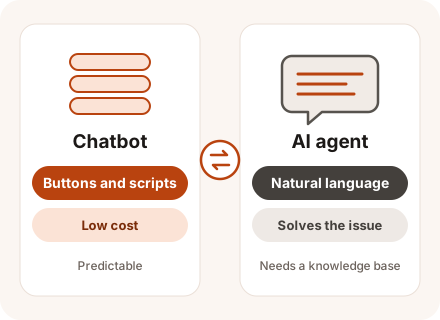
A chatbot walks the customer through buttons and prewritten answers, and it handles simple questions fast. With an AI agent, customers type the way they normally would; the agent figures out what they need, answers from your knowledge base, and can take actions in your systems. The trade-off: it takes more work to set up and needs a paid language model. CONTACT.WORK offers both, and you can run them in the same chat.
In brief
Key takeaways
- Choose a chatbot when customers ask a handful of standard questions that buttons can resolve.
- Choose an AI agent when customers write in their own words and their questions don't fit a script.
- You can use buttons and an AI agent in one chat: buttons for the most common questions, the agent for everything else.
Criteria
Side-by-side comparison
| Criterion | Chatbot | AI agent |
|---|---|---|
| How the customer writes | Taps buttons or types keywords | In their own words, typos and follow-up questions included |
| What it does | Follows a script and collects data in a set format | Answers questions and completes requests |
| Answers | Prewritten text | Written from your knowledge base |
| Unexpected question | "Sorry, I didn't get that. Please pick an option." | Asks a clarifying question |
| Launch | Map out the scripts and write the answers | Prepare the knowledge base, instructions, and integrations |
| Changes | Edit every branch of the script | Update the knowledge base |
| Cost per conversation | Low | Higher – in CONTACT.WORK, $0.029-$0.05 per conversation depending on volume |
| Predictability | Complete | Needs testing and quality monitoring |
| Working with your systems | Simple forms and lookups | Multi-step tasks through the API |
| Handoff to a live agent | Like any other chat | With a short summary and the data collected |
| Channels | Web chat and messaging apps | Web chat, messaging apps, and email |
How to choose
When to choose which
When to choose a chatbot
A chatbot works when your conversation flows are simple and the same for every customer.
- You have a few clear use cases: order status by order number, choosing a department, booking an open time slot.
- Answers must match approved wording exactly – financial notices, for example.
- You just need to collect the customer's name, phone number, and order number.
- A low cost per conversation is a priority.
When to choose an AI agent
An AI agent works when customers ask all kinds of questions that are hard to squeeze into buttons.
- Customers ask many different questions, often several in one message.
- Your knowledge base is large and changes often.
- Answers depend on context: earlier messages, or the customer's orders and bookings.
- Your agents spend a lot of time on questions already answered in the knowledge base.
Requirements
What it takes to launch
A chatbot needs scripts and answer text. An AI agent needs more:
- A knowledge base: current answers, policies, and prices.
- Instructions: tone, limits, and when to hand the conversation to a live agent.
- An API connection to the CRM and order systems, so the AI can find an order and change it.
- A language model – in our cloud or on your side. Running your own requires a server with a GPU.
Combining
How to combine them or switch
Most teams keep buttons for the most common questions and let the AI agent answer when a customer types in their own words. If neither can help, the conversation goes to a live agent with the full history. When moving from a bot to an AI agent, clean up the knowledge base first: the agent will repeat any mistake it finds in an article.
- We look through chat history for questions the chatbot couldn't answer.
- We write or update knowledge base articles for them.
- We launch the AI agent in one channel or on part of your conversations.
- We review answers and handoffs and fill the gaps in the knowledge base.
- We keep buttons wherever they're faster for the customer.
- Yes. Set it up so a human takes over on its own whenever the customer wants a person or the problem isn't solved.
Q&A
Frequently asked questions
What exactly is the difference between a chatbot and an AI agent?
A chatbot follows a script someone built in advance. An AI agent understands questions however the customer phrases them, looks for the answer in your knowledge base, and, when needed, takes action in your systems itself.
Can an AI agent make up answers?
It can make mistakes when the answer isn't in the knowledge base. That's why it answers only from verified content, sticks to its instructions, and calls in a person whenever it isn't sure.
Do we have to replace our current chatbot?
No. Keep the scripts that work and add an AI agent for the questions your bot doesn't cover.
Does an AI agent cost more than a chatbot?
It does. The language model is a paid service: in CONTACT.WORK, a text AI agent conversation costs $0.029-$0.05, and the rate goes down at higher volumes. The fair comparison is the cost of a live agent's time on the same conversation, because that's what the AI agent replaces.
What does the AI agent do when it can't help?
It passes the conversation to a person together with everything it has gathered, so the customer never has to start over.
Glossary
Terms on this page
- Chatbot
- Answers customers in chat and messaging apps from a scripted flow with buttons. Learn more →
- Knowledge base
- All answers, policies, and prices in one place – for agents and AI. Learn more →
- Large language model (LLM)
- A neural network that understands questions asked in everyday words and answers the same way. Learn more →
- API (application programming interface)
- The way programs exchange data with each other without a person in the loop. Learn more →
- Contact center quality management
- Calls and chats are scored against a scorecard to find mistakes and coach agents. Learn more →
- Connector
- A prebuilt module that links the platform with telephony, a CRM, or another system. Learn more →
- CRM – customer relationship management
- Where a company keeps its customers, deals, and full communication history. Learn more →
- Cloud deployment (cloud)
- The platform runs on the vendor's servers, and agents connect over the internet. Learn more →
- Agent assist
- Suggests answers from the knowledge base to the agent during a conversation. Learn more →
Updated: