Comparisons
Cloud vs. on-premises: a comparison for contact centers
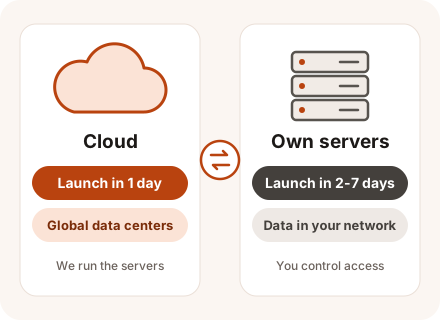
Cloud deployments run on CONTACT.WORK infrastructure in America and Britain and are ready within a day. Installing on your own servers takes 2-7 days, but recordings and customer data stay inside your network. Both options run identical software, so switching later is straightforward.
In brief
Key takeaways
- Cloud: live in one day, with servers and updates handled by us.
- On-premises: data stays in your network, and the platform can connect to closed internal systems.
- You can combine the two and switch between them – it's the same platform.
Criteria
Side-by-side comparison
| Criterion | Cloud | On-premises |
|---|---|---|
| Where the platform runs | CONTACT.WORK cloud, hosted in the US or UK | On your servers or in your data center |
| Time to launch | 1 day | 2-7 days, depending on the setup (single server or cluster) |
| What you pay for | Your support plan plus hosting in our cloud; hosting depends on the number of agents and recording volume | Your support plan plus installation work; the servers and storage are yours |
| Where recordings and data are stored | With us, on US or UK servers | On your side, inside your network |
| Who maintains the servers | We do | Your IT team, or us under a support contract |
| Growing the team | New seats the same day | A large team will need additional servers |
| Connecting to your systems | Over the internet, through the API | Directly, including internal systems with no internet access |
| If the internet goes down | Agents lose their connection to the platform | The platform keeps running inside your network |
How to choose
When to choose which
When to choose the cloud
Pick the cloud if speed matters and maintaining servers isn't something you want to take on.
- You're a small company – the cloud is the easiest place to start.
- You're opening a new contact center or trying the platform with part of your team.
- Your headcount goes up and down over the year.
- You don't have server or phone system administrators on staff.
- Your policies permit customer data to be kept by an outside provider in the US or the UK.
- Your agents work from home or from different cities.
When to choose on-premises
Your own servers fit when customer data has to stay inside your network.
- You have your own data center and an IT team to maintain the platform.
- Your security team requires recordings and customer data to be stored in-house – common in banking, healthcare, and government.
- The contact center has to work with internal systems that aren't connected to the internet.
- You already have your own PBX, phone lines, and servers – you can use them instead of paying for hosting.
Requirements
What on-premises requires
Final sizing depends on your workload. Typical starting points:
- A small contact center with up to 10 agents runs on a single server.
- As the team grows, so does the server count – up to four servers for 61-200 agents – and parts of the platform move to separate machines. The server calculator gives you the exact setup.
- If you need fault tolerance, we add standby servers and build a cluster.
- Call recordings go on a separate SATA drive: about 90 GB per 1,000 hours of calls, including the separate per-channel recordings used for speech analytics.
- To run AI agents entirely on your side, you'll need a server with a GPU.
Combining
How to combine them or switch
Because it's the same system in both cases, your call flows, settings, and integrations move with it. Many companies start in the cloud and move to their own servers once their data requirements are clear.
You can also mix the two: for example, keep telephony and recordings in your own data center and run AI agents and analytics in the CONTACT.WORK cloud, if your organization's policies allow it.
- We work with you to decide which data has to stay on your side.
- We launch the platform in the cloud – in one day.
- You prepare the servers, and we install the platform on them – in 2-7 days.
- We migrate your settings and switch your numbers over at a time that works for you.
Q&A
Frequently asked questions
Is on-premises more expensive than the cloud?
Up front, it is: you need hardware and time for installation. The platform itself is free – with either option, you pay only for support under your chosen plan. In the cloud, hosting is added on top, and its cost depends on the number of agents and recording volume. Compare the total cost over 3-5 years, not the first invoice.
Where is your cloud located?
On our American and British servers – recordings and customer data are kept there too.
Which is more secure – cloud or on-premises?
Security depends on how the platform is maintained. The difference is control: on your own servers, your security team decides where data lives and who can access it.
Can we move from the cloud to our own servers later?
Yes. Call flows, settings, and integrations are carried over, and the number cutover happens when it suits you.
Can we run AI agents on our own servers?
They work on-premises too. AI agents, chatbots, and speech analytics are platform modules and run on your servers the same way they do in the cloud. The AI models can be deployed on your side as well – you'll need a server with a GPU or spare capacity on the reporting server. In that case there are no per-minute AI service fees: you use your own agents on your own infrastructure, and their implementation and training are billed as development hours.
What is a hybrid deployment?
Some components run on your servers, the rest in the CONTACT.WORK cloud. Your security team decides with us which piece goes where.
Glossary
Terms on this page
- Cloud deployment (cloud)
- The platform runs on the vendor's servers, and agents connect over the internet. Learn more →
- On-premises deployment
- The system runs on the company's own servers, not in the vendor's cloud. Learn more →
- Hosting
- You rent a server from a provider instead of buying one. Learn more →
- Data center
- A building with servers, backup power, cooling, and network links. Learn more →
- Server cluster
- A group of machines that share the load and back each other up. Learn more →
- Speech analytics
- The system analyzes recorded calls automatically: topics, script adherence, customer emotions. Learn more →
- Customer record
- The screen of customer data an agent sees during a conversation. Learn more →
- API (application programming interface)
- The way programs exchange data with each other without a person in the loop. Learn more →
- IP PBX
- A company phone system that runs over the internet and your local network. Learn more →
- Fault tolerance
- The system keeps running even if a server, disk, or network link fails. Learn more →
- Call recording
- Calls are saved so they can be replayed and disputes settled. Learn more →
- Support tiers
- A support tier: tier 1 handles common issues, tier 2 handles complex ones. Learn more →
- Chatbot
- Answers customers in chat and messaging apps from a scripted flow with buttons. Learn more →
- Hybrid deployment
- Part of the system runs on the company's servers, part in the vendor's cloud. Learn more →
Updated: