Comparisons
IVR or voice AI agent: which to choose for inbound calls
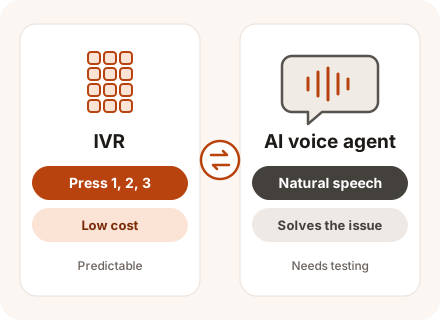
An IVR (phone menu) has callers press a key or say a short phrase and sends the call to the right department. A voice AI agent understands free-form speech and solves the request on its own, but setup costs more and it needs a knowledge base first. CONTACT.WORK provides both, and they can share a single call.
In brief
Key takeaways
- An IVR works when the main job is to route calls to departments quickly or give a couple of short answers.
- A voice AI agent works when callers explain their issue in their own words and want an answer right away.
- The IVR handles routing; the agent handles the conversation itself.
Criteria
Side-by-side comparison
| Criterion | IVR | Voice AI agent |
|---|---|---|
| How the caller talks | Presses keys or says short phrases | In their own words |
| What it does | Routes the call to the right department, handles simple requests | Resolves the caller's issue itself |
| Call flow | A predefined menu | Adapts to the caller |
| Unexpected question | Repeats the menu or transfers to a live agent | Asks clarifying questions |
| Launch | Design the menu and record the prompts | Prepare the knowledge base, call flows, and integrations |
| Changes | Re-record the prompts | Update the knowledge base |
| Cost per minute | Low – your regular telephony rates | Higher – in CONTACT.WORK, $0.038-$0.06 per minute depending on volume |
| Predictability | Complete | Answers need checking before and after launch |
| Integration with your systems | Simple data lookups | Looks up and records data during the call |
| Caller experience | A long menu frustrates callers | Feels like talking to a person |
| Handoff to a live agent | Like any other call | With a short summary of the conversation |
How to choose
When to choose which
When to choose an IVR
An IVR fits when your call flows are simple and similar.
- There are only a few reasons people call, and callers know where they need to go.
- The task comes down to choosing a department or a language.
- Callers often ask the same things: order status by order number, business hours.
- Prompt wording must match approved text exactly.
- Calls are short, and a low cost per minute is a priority.
When to choose a voice AI agent
A voice agent makes sense when people call for many different reasons, but many of the calls are routine.
- There are many reasons people call, and your menu has grown too long.
- Callers abandon the menu or press zero right away to reach a live agent.
- Answering means looking up data and taking action: booking, rescheduling, checking an order.
- You want to answer at night and during peaks without hiring more agents.
- Your agents keep answering the same handful of questions.
Requirements
What it takes to launch
An IVR needs a call flow and recorded prompts. An AI agent needs more:
- A knowledge base: answers to common questions, policies, and prices.
- Call flows: what the agent does in each situation and when it transfers the call to a live agent.
- API connections to your CRM and back-office systems: the agent pulls data from them and records the call outcome.
- Speech recognition and text-to-speech in the language your callers speak.
- All three AI components – recognizing speech, generating the voice, and producing answers – can live with us or on a GPU server of yours.
Combining
How to combine them or switch
Many teams combine them: a brief menu picks the language or department, the AI handles the conversation, and anything it can't solve goes to a person along with a short summary. Moving from IVR to AI works best in steps, one call reason at a time.
- We identify the main call reasons from recordings, reports, and speech analytics.
- We pick one or two common, clear-cut reasons.
- We hand them to the AI agent and leave everything else in the IVR.
- We track how many calls the agent resolves by itself and how many it transfers to a live agent.
- Once results are stable, we move on to the next reason.
- If the caller asks for a person, or the AI can't solve the issue, the call goes to a human automatically.
Q&A
Frequently asked questions
What exactly is the difference between an IVR and a voice AI agent?
An IVR asks the caller to pick an option with a key press or a short phrase and routes the call onward. An AI agent understands a question asked in the caller's own words and answers it or completes the request itself.
How do we keep callers from hanging up in the IVR?
Keep the menu to 3-5 options, put the most common ones first, and let callers reach a live agent right away. If the option list keeps growing, it's worth handing some calls to a voice AI agent.
Does an AI agent cost more than an IVR?
It does. Speech recognition, text-to-speech, and the language model cost more than playing recorded prompts. In CONTACT.WORK, a minute of a voice AI agent costs $0.038-$0.06, and the rate goes down as volume grows. The fair comparison is a live agent's minute on the same call, because that's the work the AI agent takes over.
What happens if the voice agent can't handle a call?
The call goes to a live agent along with everything the AI agent has learned, so the caller doesn't have to start over.
Do we have to tell callers they're talking to AI?
We recommend saying so at the start of the call so callers know what to expect. In some places it's required by law.
Glossary
Terms on this page
- IVR (interactive voice response)
- A phone menu: the caller hears a greeting and picks the right department. Learn more →
- Knowledge base
- All answers, policies, and prices in one place – for agents and AI. Learn more →
- API (application programming interface)
- The way programs exchange data with each other without a person in the loop. Learn more →
- Speech analytics
- The system analyzes recorded calls automatically: topics, script adherence, customer emotions. Learn more →
- Speech-to-text
- Turns spoken conversation into text. Learn more →
- Text-to-speech
- Reads text aloud in a human-like voice. Learn more →
- Call routing
- Rules the system uses to decide who gets a call. Learn more →
- CRM – customer relationship management
- Where a company keeps its customers, deals, and full communication history. Learn more →
- Agent assist
- Suggests answers from the knowledge base to the agent during a conversation. Learn more →
- Large language model (LLM)
- A neural network that understands questions asked in everyday words and answers the same way. Learn more →
Updated: